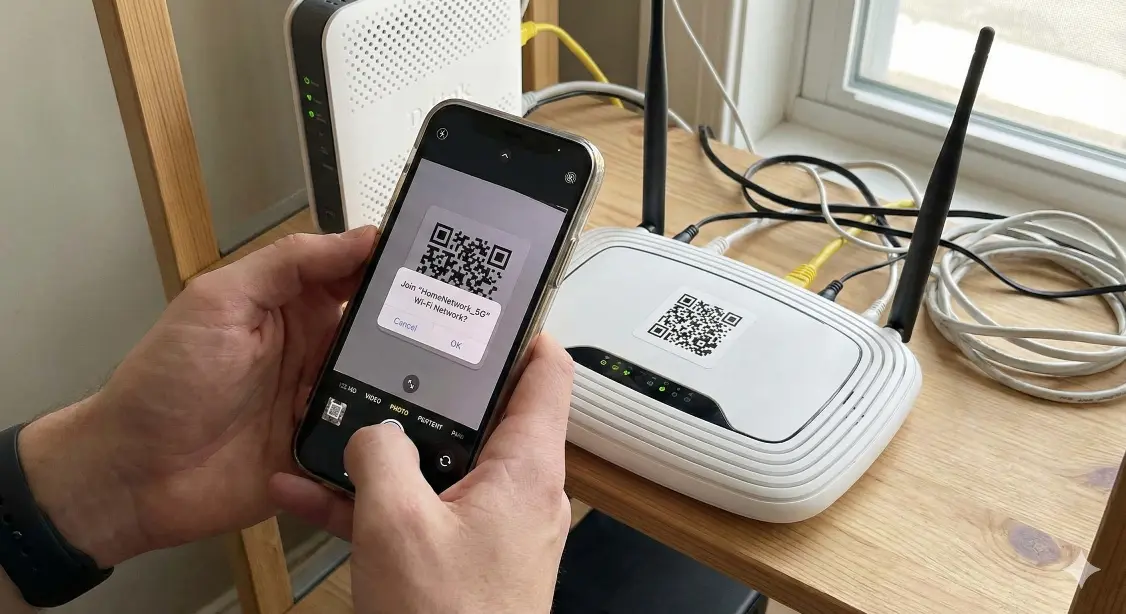
Create a Wi-Fi QR code to let guests connect to your network instantly without typing the password. Simple step-by-step guide for home, office, and café use.
Sharing your Wi-Fi password manually can be frustrating, especially when the password is long, complicated, or hard to remember. Typing mistakes, repeated sharing, and privacy concerns make it inconvenient for both owners and guests.
That’s why many homes, offices, cafés, and small businesses now use a Wi-Fi QR code. Instead of typing the password, guests simply scan the QR code and connect instantly.
In this simple guide, you’ll learn how to create a Wi-Fi QR code for your network in just a few seconds, and how to use it safely in real-world situations.
What is a Wi-Fi QR Code?
A Wi-Fi QR code contains your network name (SSID), encryption type, and password. When someone scans it with their phone, the device automatically:
- Detects the Wi-Fi network
- Fills in the password
- Connects instantly
No typing, no sharing passwords verbally, and no confusion.

How to Create a Wi-Fi QR Code (Step-by-Step) ?
Follow these quick steps:
- Go to MakeQRFree.com
- Select Wi-Fi QR Code Generator
- Enter your Wi-Fi network name (SSID)
- Select your encryption type (WPA/WPA2/WPA3)
- Enter your Wi-Fi password
- Click Generate QR Code
- Download your QR code (PNG / SVG / Print)
Now you can display it anywhere guests need access.
Important Tips for Secure Wi-Fi QR Codes :
To protect your network:
- Do not display QR codes in public areas unless necessary
- Avoid sharing your main network, use a guest network instead
- Update the QR code if the password changes
- Test the QR code before printing
- Keep the QR size large enough for easy scanning
Security and convenience should always work together.
Where Can You Use a Wi-Fi QR Code?
Wi-Fi QR codes are useful in many situations, including:
- Homes and apartments for guests
- Office reception or meeting rooms
- Cafés, restaurants, and coworking spaces
- Hotels, hostels, and paying guest facilities
- Schools, libraries, and study halls
- Events, exhibitions, and workshops
They make access quick, professional, and hassle-free.

Static vs Dynamic Wi-Fi QR Codes :
Static Wi-Fi QR Code
- Directly contains SSID + password
- Cannot be edited later
- Best for personal or simple networks
Dynamic Wi-Fi QR Code
- Lets you change details without reprinting
- Supports analytics and scan tracking
- Best for cafés, offices, and business use
Best Practices for Printing Your Wi-Fi QR Code “
For the best scan experience:
- Use a white or light background
- Maintain at least 2.5-3 cm minimum size
- Avoid blurry or low-resolution prints
- Keep good contrast between code and background
- Place it where light is adequate
A clean print ensures smooth scanning on all devices.
Final Thoughts :
A Wi-Fi QR code makes sharing your network fast, professional, and secure, whether at home, in the office, or in a café. It saves time, avoids mistakes, and improves the guest experience.
You can create your own free Wi-Fi QR code anytime using :
MakeQRFree.com - Free QR Code Generator
FAQ Section
Q1. Is it safe to share my Wi-Fi password using a QR code?
Yes, but for extra safety, use a separate guest network for visitors.
Q2. Do Wi-Fi QR codes work on all smartphones?
Most modern Android and iOS phones support Wi-Fi QR code scanning.
Q3. Can I change the password later?
Yes, but you’ll need to generate a new QR code unless it’s dynamic.
Q4. Do Wi-Fi QR codes work without internet?
Yes, scanning only connects to the network. Internet depends on your router.
**Author: Make QR Free Team**
Make QR Free Team writes practical, beginner-friendly guides about QR codes, digital tools, and smart technology solutions. His goal is to help users understand and use technology in simple, meaningful ways.